When Atmos disappears: what it looks like in real setups
When Dolby Atmos stops working on Apple TV, the symptoms are usually consistent: your soundbar shows “PCM” or “Dolby Audio” instead of Atmos, the Apple TV audio format looks “stuck”, or Atmos works in one app but not another. In some homes it fails only after a TV firmware update, after switching HDMI ports, or after adding a console to the chain.
The key is to treat Atmos as a chain, not a single toggle. Apple TV has to output the right format, the HDMI link has to carry it, the TV has to pass it correctly (if it’s in the middle), and the soundbar/AVR has to decode it without being forced into a fallback mode.
I see this most often on UK living-room setups where the Apple TV goes into the TV and the soundbar relies on eARC, because one wrong TV audio setting can silently force stereo PCM.
How Apple TV sends Atmos (and why the chain matters)
On Apple TV 4K, Atmos is typically delivered as Dolby MAT (multichannel PCM with Atmos metadata) over HDMI. That detail matters because some TVs and soundbars handle Dolby Digital Plus Atmos fine from built-in apps, but behave differently when the source is MAT from an external box.
There are three common wiring topologies:
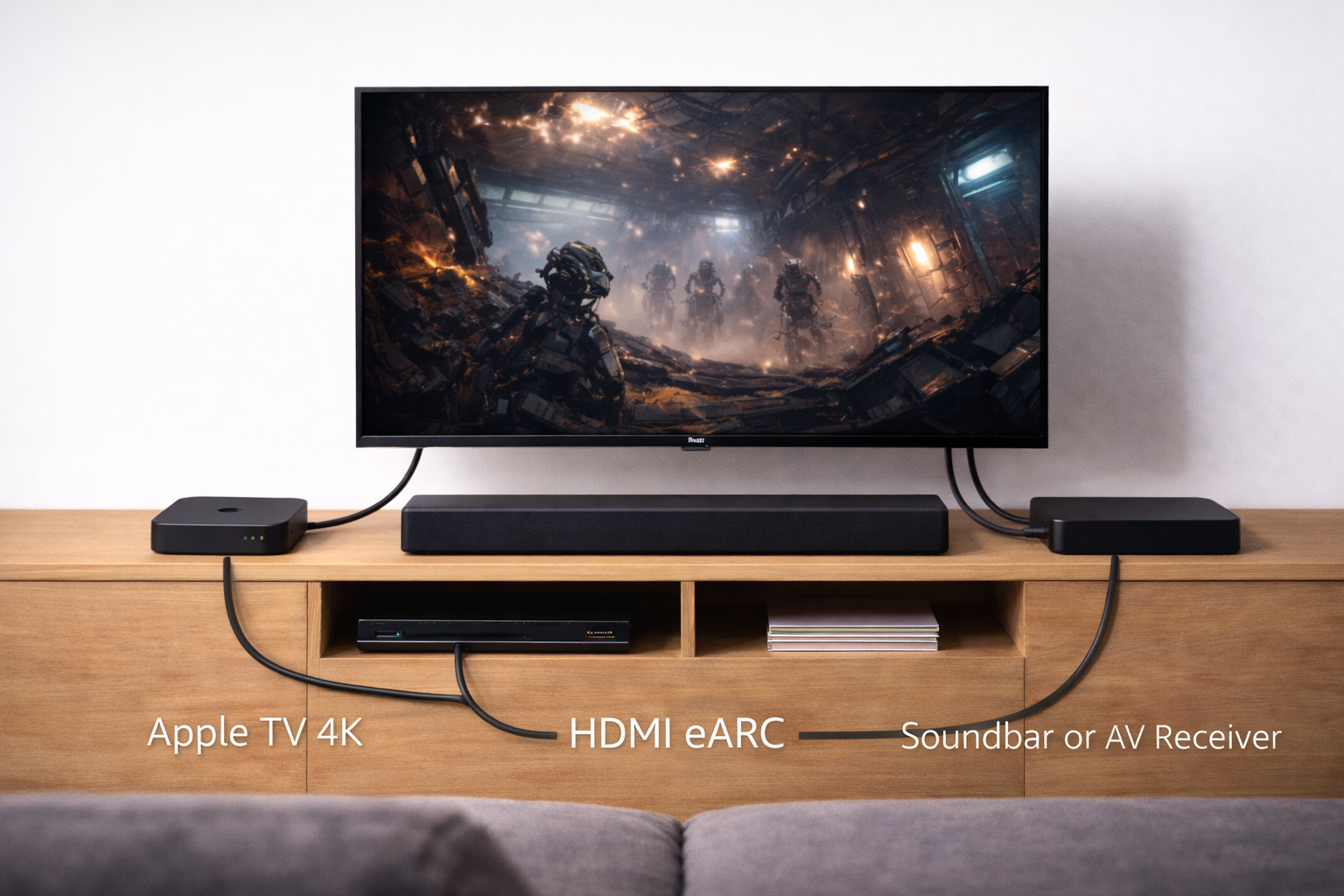
- Apple TV → TV → Soundbar via eARC: most common in the UK; relies on the TV correctly passing audio out over eARC.
- Apple TV → Soundbar/AVR → TV: often the most reliable for Atmos, but only if your soundbar/AVR has full HDMI pass-through and supports the video formats you use.
- Apple TV → TV → Soundbar via ARC (not eARC): frequently the reason Atmos never appears, because ARC bandwidth and TV support are limited.
Also, Atmos availability is content-dependent. A title can show an Atmos badge in one region or subscription tier and not in another, and some apps only output Atmos on specific audio tracks. This is why you should test with known-good Atmos titles in at least two apps before changing hardware.
For Apple’s official expectations around formats and setup, keep their documentation handy: Apple TV audio formats and Dolby Atmos setup.
Pre-flight checks before you change settings
Do these quick checks first; they prevent you from chasing the wrong problem.
- Confirm your hardware can do Atmos: Apple TV 4K model, an Atmos-capable soundbar/AVR, and either eARC on the TV or direct HDMI into the sound system.
- Use the right HDMI ports: TV eARC/ARC port to the soundbar’s HDMI eARC/ARC port; Apple TV into a normal HDMI input (or into the soundbar/AVR if using pass-through).
- Check the soundbar display/app: many bars show “Dolby Atmos” only when the stream is active; menus and stereo content won’t trigger it.
- Test with a known Atmos title: don’t rely on trailers or random episodes; pick a title you’ve previously seen output Atmos.
In practice, a surprising number of “Atmos not working” reports are actually “Atmos not available on this specific title/track right now”.
Fix path A: Apple TV audio settings that block Atmos
Start on the Apple TV itself. One wrong toggle can force a permanent fallback.
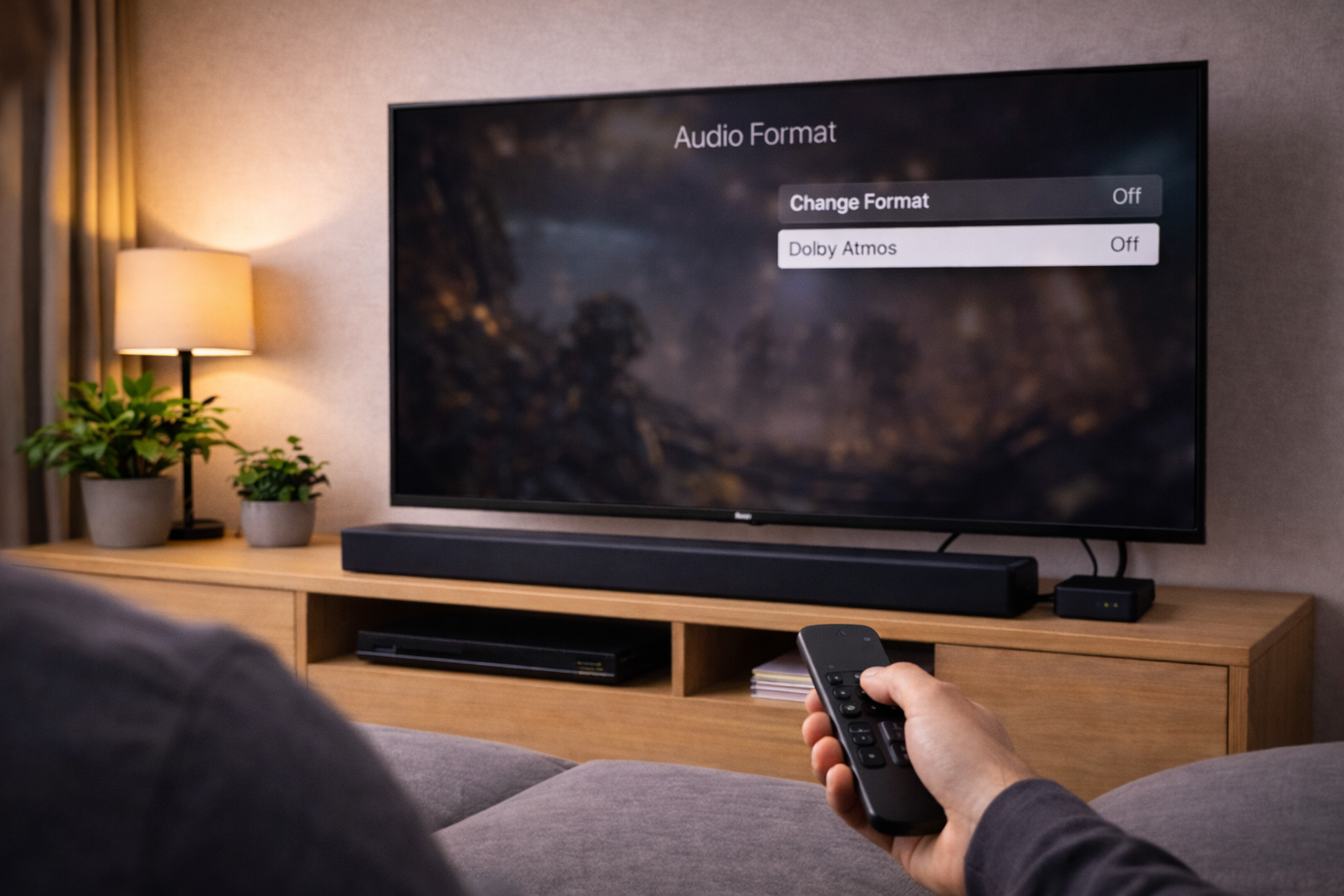
1) Set Audio Format to Auto (and stop forcing Dolby Digital)
- On Apple TV: Settings → Video and Audio → Audio Format.
- Set Audio Format to Auto.
- Set Change Format to Off (if you see it).
If you force Dolby Digital 5.1, you often lose Atmos entirely because the Apple TV stops outputting the Atmos-capable format. This is the single most common misconfiguration I see after people try to “fix” lip-sync or compatibility issues.
2) Check Spatial Audio / AirPods routing isn’t hijacking output
If you’ve paired AirPods or Bluetooth headphones, Apple TV can route audio away from HDMI without making it obvious.
- Hold the TV button to open Control Centre, check Audio Output.
- Select your TV Speakers / Receiver / Soundbar (HDMI) output.
I’ve seen Atmos “vanish” simply because the Apple TV kept a previous Bluetooth output selected after a late-night viewing session.
3) Update tvOS (and reboot properly)
- Settings → System → Software Updates → Update Software.
- After updating, do a full restart: Settings → System → Restart.
In real homes, a restart fixes HDMI handshake weirdness in about half of cases, especially after a TV firmware update.
Fix path B: TV settings that silently downgrade audio
If your Apple TV connects to the TV and the soundbar uses eARC, the TV becomes the gatekeeper. Different brands label the same settings differently, but the failure modes are similar.
1) Turn on eARC (not just ARC)
On the TV, find the HDMI sound settings and enable eARC. If you only have ARC, Atmos may still work in limited cases (usually Dolby Digital Plus Atmos), but Apple TV’s MAT output commonly fails back to 5.1 or stereo.
This is the most common issue I see on TVs sold in the UK before 2021, where eARC exists but ships disabled by default.
2) Set Digital Audio Output to Pass Through / Bitstream
Look for a setting like:
- Digital Sound Output: Pass Through / Auto / Bitstream
- HDMI Audio Format: Bitstream
- eARC Mode: Auto
Avoid settings that explicitly say PCM if you want Atmos. PCM output from the TV often means it’s decoding and re-encoding (or downmixing), which can strip Atmos metadata.
3) Disable “TV Speakers + External” dual output modes
Some TVs offer a mode that plays through TV speakers and the soundbar at the same time. That mode frequently forces stereo PCM for sync reasons.
- Set sound output to HDMI eARC / Receiver only.
- Disable any “Simultaneous output” or “Sound share” options.
I’ve repeatedly seen this break Atmos on mid-range sets where the dual-output feature is tuned for sports viewing, not surround formats.
Fix path C: HDMI handshake and cable problems (the boring but common cause)
Atmos is sensitive to HDMI negotiation. If the TV and soundbar disagree about capabilities, the Apple TV will choose a safer format.
1) Power-cycle in the correct order
- Turn everything off.
- Unplug TV, soundbar/AVR, and Apple TV from mains for 60 seconds.
- Plug in the TV first and wait until it’s fully on.
- Plug in the soundbar/AVR next.
- Plug in the Apple TV last.
This forces a fresh EDID/CEC handshake. In practice, this step fixes the “it worked yesterday” Atmos failure more often than any single menu change.
2) Swap the HDMI cable on the eARC link first
If you only replace one cable, replace the one between the TV’s eARC port and the soundbar/AVR. That link carries the return audio and is the most likely to cause intermittent format fallback.
Issues like this often come down to the cable itself rather than the device, especially when a cable was bundled with older kit and has been bent tightly behind a wall-mounted TV.
If you need a known-good spec for troubleshooting, use a Ultra High Speed HDMI 2.1 cable.
3) Avoid HDMI switches and capture devices during testing
Temporarily remove:
- HDMI switches (even “8K” ones)
- Ambilight sync boxes / LED sync devices
- AV capture cards
- Long HDMI runs with couplers
These devices often report limited audio capabilities to the Apple TV, so it never even attempts Atmos.
Fix path D: Soundbar/AVR settings that force a downmix
Sound systems can also be the bottleneck, especially if they have “night mode” or “voice” processing enabled.
1) Turn off Night Mode / Dynamic Range Compression
On many soundbars, Night Mode reduces channel count or changes decoding behaviour. Disable it while testing.
I see this a lot on compact soundbars where Night Mode is toggled from the remote by accident and there’s no obvious on-screen indicator.
2) Set the sound mode to Direct / Auto (not Stereo or Virtual)
- Choose Auto, Direct, or Standard decoding.
- Avoid Stereo, PCM, or aggressive Virtual Surround modes during diagnosis.
Some “virtual” modes still accept Atmos, but plenty of models switch to a 2.0/2.1 processing path and never light the Atmos indicator.
3) If your soundbar has HDMI IN, test Apple TV directly into it
This is a powerful isolation test:
- Connect Apple TV → Soundbar HDMI IN
- Connect Soundbar HDMI OUT (eARC/ARC) → TV eARC
If Atmos works in this topology, your TV’s pass-through settings (or ARC limitations) are the problem, not the Apple TV.
If you’re also seeing dropouts or no audio over eARC, the fix path overlaps heavily with Fix Soundbar No Audio via HDMI eARC.
App-by-app reality: why Atmos works on Disney+ but not Netflix (or vice versa)
Once the chain is correct, app behaviour becomes the next culprit. Atmos availability can differ by:
- Subscription tier
- Device support (Apple TV vs built-in TV app)
- Specific title/episode audio track
- Temporary CDN/stream selection issues when bandwidth dips
What I do in the field is simple: test two different Atmos titles in two different apps, then compare. If only one app fails, stop changing HDMI settings and focus on the app.
For a neutral reference on what Atmos is and how it’s delivered across devices, use Dolby Atmos setup and playback overview.
Diagnostic sequence (10 minutes, minimal guesswork)
If you want the fastest path without bouncing between menus, follow this order. It’s designed to isolate the failing link.
- Confirm wiring: TV eARC port to soundbar eARC/ARC port; Apple TV on a separate HDMI input (or direct to soundbar HDMI IN for the isolation test).
- Apple TV: Audio Format = Auto; Change Format = Off.
- TV: eARC = On/Auto; Digital Audio Output = Pass Through/Bitstream; disable dual output.
- Power-cycle all devices in the correct order.
- Swap the eARC HDMI cable (TV ↔ soundbar).
- Isolation test: Apple TV direct into soundbar/AVR HDMI IN (if available).
- App test: two known Atmos titles across two apps.
In practice, steps 2–4 resolve the majority of cases without touching advanced options.
Real-world failure stories I keep seeing (and what fixed them)
Case 1: Atmos worked on the TV’s Netflix app, but not on Apple TV
This usually points to MAT vs DD+ handling. The fix was enabling eARC (it was set to ARC), then setting the TV’s digital audio output to Pass Through. After a full power-cycle, the soundbar started showing Atmos from Apple TV as well.
I rarely see this issue on newer 2024+ TVs where eARC is enabled by default, but it’s common on earlier firmware builds.
Case 2: Atmos stopped after moving the Apple TV to a different HDMI port
The new port was on a “legacy” HDMI mode on the TV. Switching that HDMI input to the TV’s enhanced format (often labelled Enhanced/4K/8K/Deep Colour) restored stable negotiation, and Atmos returned after a restart.
This is one of those fixes that feels unrelated to audio, but HDMI capability negotiation is shared across video and audio.
Case 3: Atmos appears for 10 seconds, then drops to PCM
That pattern is nearly always a flaky eARC cable or a CEC/eARC handshake loop. Replacing the TV-to-soundbar cable and disabling CEC temporarily for testing stabilised it. Once stable, CEC could be re-enabled without breaking Atmos.
In real homes, not lab setups, tight cable bends behind wall mounts are a repeat offender here.
Easy-to-miss mistakes that keep Atmos off
- Using the wrong HDMI port on the TV: eARC is usually only on one port; plugging the soundbar into a normal HDMI input will limit formats.
- Assuming “ARC” equals “eARC”: they are not interchangeable for reliable Atmos from Apple TV.
- Forcing Dolby Digital 5.1 on Apple TV: it can fix compatibility but kills Atmos.
- Leaving a soundbar in Stereo mode: some bars remember the last mode per input.
- Testing with non-Atmos content: many apps show badges inconsistently; always verify the audio track during playback.
- HDMI devices in the middle: switches and sync boxes often advertise limited audio support.
If your whole TV/sound chain is behaving oddly (input switching, HDMI no signal, random renegotiation), it’s worth stepping back and checking the broader HDMI setup. How to Connect Your TV, Soundbar & Console the Right Way (2026) covers the common UK wiring patterns that avoid these loops.
Recommended kit and settings choices that reduce repeat failures
You don’t need new hardware for Atmos in most cases, but a few choices reduce the chance of it breaking again after updates or power cuts.
- Use a certified Ultra High Speed HDMI cable on the eARC link, especially if the current cable is older, unbranded, or routed tightly.
- Prefer direct-to-AVR/soundbar HDMI IN if your TV is known to be picky about pass-through formats.
- Keep processing modes simple (Auto/Direct) on the soundbar during troubleshooting, then re-enable enhancements one by one.
- Leave Apple TV on Auto audio and fix lip-sync using the TV/soundbar delay controls rather than forcing a different format.
This is usually where unstable behaviour stops when cheaper HDMI leads or extra boxes in the chain are removed.
Wrap-up: get Atmos back without random toggling
Fixing Dolby Atmos not working on Apple TV is mostly about restoring a clean HDMI/eARC negotiation and stopping any device from forcing PCM or Dolby Digital 5.1. Start with Apple TV audio set to Auto, then verify TV eARC and pass-through settings, then power-cycle and swap the eARC cable if the problem persists.
Once the chain is correct, treat app-specific failures as app issues, not HDMI issues. That approach avoids the common loop where people change five settings and accidentally make the system less compatible.
FAQ: Apple TV Atmos edge cases people hit in UK homes
Why does Dolby Atmos work on my TV’s built-in app but not on Apple TV 4K?
This usually comes down to the TV handling Dolby Digital Plus Atmos internally, but failing to pass Apple TV’s Atmos output over eARC when eARC is disabled or pass-through is set incorrectly. Set the TV to eARC On/Auto and Digital Audio Output to Pass Through/Bitstream, then reboot everything. This is the most common issue I see on mid-range UK TVs where ARC is enabled by default and eARC is hidden in an “advanced” menu.
Why does Apple TV show Atmos available, but my soundbar only shows “Multichannel PCM”?
On Apple TV, Atmos can be carried inside Dolby MAT, which some soundbars display as multichannel PCM even when height metadata is present. The reliable test is whether your soundbar app reports an Atmos signal during playback, not what the front panel abbreviates. If you never see an Atmos indicator anywhere, re-check that Apple TV isn’t forcing Dolby Digital and that the TV is set to pass-through.
Atmos worked yesterday, then stopped after a tvOS or TV firmware update—what actually fixes it?
A full power-cycle in the correct order (TV, then soundbar/AVR, then Apple TV) is the fastest fix because it resets HDMI capability negotiation. If it still fails, swap the TV-to-soundbar eARC cable next. In practice, updates expose marginal cables and handshake timing issues more than they “break Atmos” directly.
Can I get Dolby Atmos over ARC (not eARC) with Apple TV in the UK?
Sometimes, but it’s inconsistent. ARC often tops out at Dolby Digital 5.1, and even when a TV supports Dolby Digital Plus over ARC, Apple TV’s Atmos output path may not negotiate the way you expect. If your TV and soundbar only have ARC, the most reliable workaround is connecting Apple TV directly to an AVR/soundbar HDMI input that supports Atmos.
Why does Atmos work on Disney+ but not Netflix on the same Apple TV?
That’s usually an app/content/tier issue rather than HDMI. Netflix Atmos can depend on plan level, title availability, and the specific audio track selected, and it can fall back when stream selection changes. I troubleshoot this by testing two known Atmos titles in Netflix and another app; if only Netflix fails, stop changing TV settings and focus on Netflix playback options and account tier.
My Sonos/AVR shows Atmos, but voices are out of sync—should I force Dolby Digital 5.1?
Forcing Dolby Digital 5.1 often “fixes” sync by reducing processing, but it also removes Atmos. Use the TV or soundbar lip-sync/delay controls first, and keep Apple TV Audio Format on Auto. I see forced 5.1 become a permanent accidental setting that people forget about, then they wonder why Atmos never returns.
Recommended gear on Amazon UK
- An Ultra High Speed HDMI cable is the quickest way to rule out flaky eARC handshakes when Atmos drops to PCM or stops working after a firmware update. View Ultra High Speed HDMI 2.1 cable (2m) on Amazon UK
- A longer certified HDMI cable helps when the TV-to-soundbar run is routed around a wall mount and tight bends are causing intermittent Atmos negotiation. View HDMI 2.1 certified cable (3m) on Amazon UK
- An HDMI coupler can help as a temporary diagnostic tool to test a known-good short cable on the eARC link without re-routing cables through trunking. View HDMI coupler (female to female) on Amazon UK
- A TOSLINK cable is useful for confirming the soundbar can decode basic surround audio when HDMI eARC is unstable, even though it won’t carry Atmos. View Optical TOSLINK cable on Amazon UK